AI Photo Critique & Photography Records

Professional Photography Critique for the next frame

Upload a photo, understand what works, and choose what to try on your next shoot. Keep your photography record together as you continue.

Think like a pro photographer

  • Flash Critique

    Instant response with precise five-dimensional scoring for composition, lighting, color, and more.

  • Your Photography Record

    Keep full critiques and originals together while subscribed. Return to past shoots and keep critiquing without a monthly limit.

  • Progress Tracking

    Compare critiques for the same photo or practice goal, with score changes and visual evidence for each result.

AI Photo Critique & Photography Records

Upload a photo, understand what works, and choose what to try on your next shoot. Keep your photography record together as you continue.

Upload a photo for critique

Five scores · Strengths and issues · Actionable suggestions

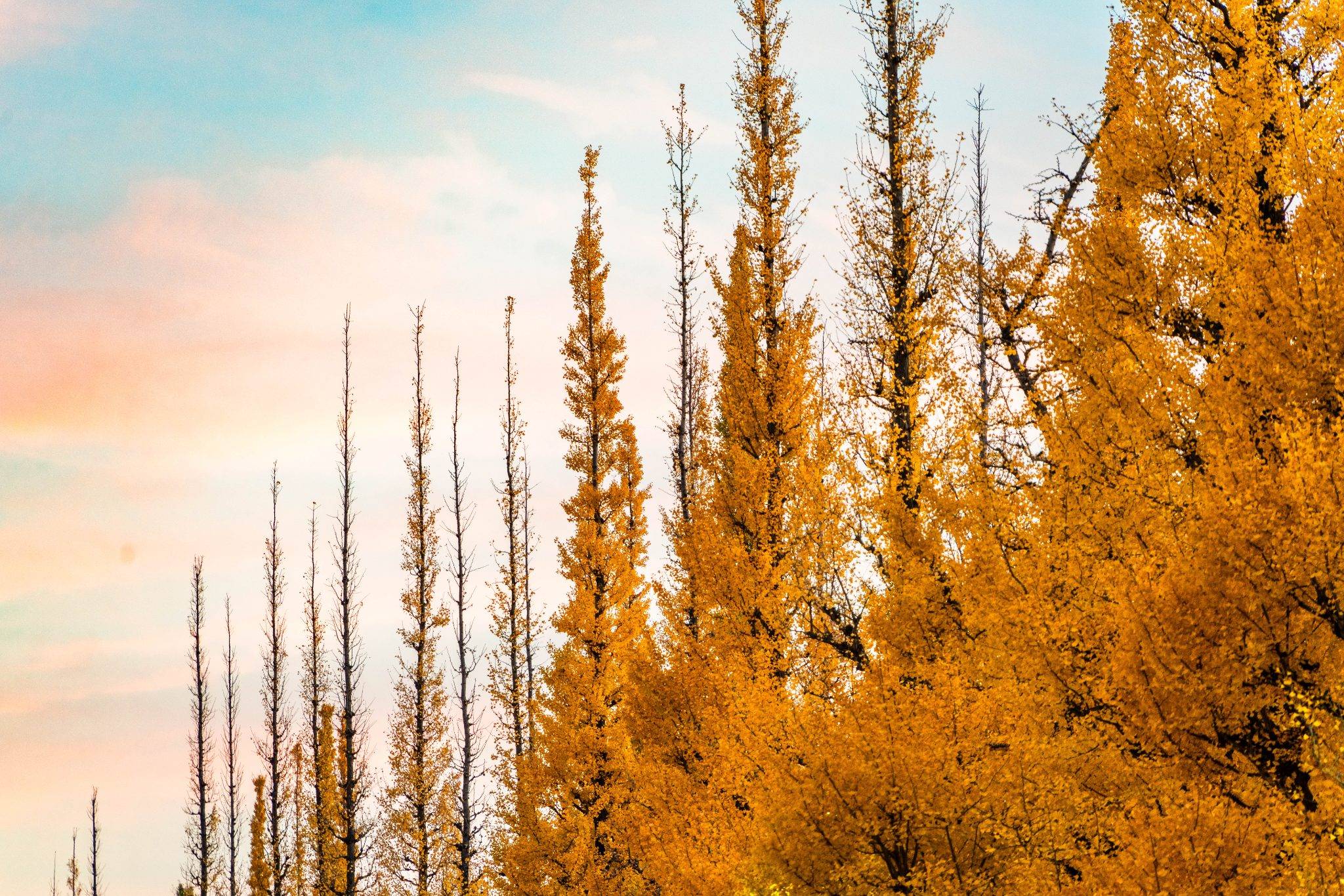
Sample critique photo: golden-hour ginkgo canopy with backlit leaves, blue gradient sky, and roughly 4500K warm-cool color contrast

Overall Score

  • Composition7
  • Lighting8
  • Color9
  • Impact7
  • Technical6

SuggestionsStep back 5–8 m and lower the camera to include fallen leaves as a leading-line foreground. Shoot within 20 min of sunrise with a gentle breeze for added depth and narrative.

View full critique example

Gallery

Gallery

Using AI photo critique

What can the critique tell you about your photo?

Look for visible evidence

AI can point out competing subjects, distracting edges, light and color relationships, and apparent detail loss. In the ginkgo example above, it identifies the warm leaves against the blue sky and suggests foreground detail to give the scene more depth.

Explore photo critique examples →

Check it against your intention

You decide whether the canopy is meant to feel abstract or show a place. More foreground may help a story but weaken a simple color study. Check any claim about focus or exposure against the original file; a preview cannot establish camera settings or recover clipped detail.

Check the composition yourself →

Choose one next-shoot action

For that ginkgo photo, try a lower viewpoint that includes fallen leaves while keeping the canopy as the subject. Compare whether the foreground adds depth without taking attention away from the leaves. Keep the original and retake together; a higher score alone does not show improvement.

Follow the shoot–review–retake workflow →

Core Features

Think like a pro photographer

  1. Upload a Photo

    Upload a photo, understand what works, and choose what to try on your next shoot. Keep your photography record together as you continue.

  2. Flash Critique

    Instant response with precise five-dimensional scoring for composition, lighting, color, and more.

  3. Suggestions

    AI reviews composition, light, color, impact, and technique before turning them into practical advice.

  4. Compare the original and retake with evidence

    Choose a previous frame and upload the retake for five-part deltas, visual evidence, and a concrete next-shoot checklist.

  5. Progress Tracking

    Compare critiques for the same photo or practice goal, with score changes and visual evidence for each result.

Workspace

Compare the original and retake with evidence

Choose a previous frame and upload the retake for five-part deltas, visual evidence, and a concrete next-shoot checklist.

Open Retake Coach

AI Create

AI image creation now uses GPT Image 2

Generate photo inspiration, social visuals, portrait avatars, product scenes, and color moodboards directly in PicSpeak. Pro includes 199 credits every month.

Open AI Create

Free / Pro Boundary

Start with Free. Keep your photography record with Pro.

Both plans include the complete critique, next-shoot advice, and retake comparison. Pro keeps full history and originals while subscribed, with no monthly critique limit. At 150 critiques in a UTC month, a usage reminder appears and new critiques slow to 2 per minute until the next UTC month; there is no monthly critique cap or automatic extra charge.

Guest

1 / day, 30 / month

  • Flash only
  • No saved history

Free

60 / month, up to 5 / day

  • Full critique, next-shoot advice, and retake comparison
  • 10 Pro previews / month
  • 15-day history retention
Pro

Pro

$3.99 / month

Unlimited

  • Full history and originals while subscribed
  • No monthly critique limit
  • Pro mode every time, priority processing

AI Image Credits

AI image generation pricing

PicSpeak meters GPT Image 2 generation with credits. Free includes 3 credits/month, and Pro includes 199 credits/month.

Open AI Create

Low

1 credit / image

Fast inspiration drafts for testing direction.

Medium

8 credits / portrait or landscape · 10 credits / square

Sharper reference images for everyday creation.

High

30 credits / portrait or landscape · 40 credits / square

Final-quality renders when richer detail matters.

Image generation is powered by GPT Image 2. Review-linked reference generation adds 2 credits for the source image.

Start Critiquing

Start Critiquing

FAQ

Frequently Asked Questions

PicSpeak | AI Photo Critique and GPT Image 2 Visual References